Facebook ads for beginners come down to five decisions: what result you want, who should see your ad, how much to spend, what the ad says, and how you’ll measure success.
 Ayaan Malik13 min read
In this article
- What Are Facebook Ads and How Do They Work?
- Are Facebook Ads Worth It for Beginners?
- What You Need Before You Run Your First Facebook Ad
- How to Run Facebook Ads for Beginners: 8 Steps
- Step 1: Choose one clear objective
- Step 2: Set your budget and schedule
- Step 3: Define your audience
- Step 4: Choose your placements
- Step 5: Create your ad
- Step 6: Set up conversion tracking
- Step 7: Review and publish
- Step 8: Monitor, then improve slowly
- Facebook Ad Objectives Explained
- Facebook Ad Formats: Which One Should You Use?
- How Much Do Facebook Ads Cost for Beginners?
- Facebook Ads Targeting: How to Reach the Right People
- How to Write Facebook Ad Copy That Gets Clicks
- Facebook Ads in Pakistan: What Beginners Should Know
- Facebook Ads for Beginners: 10 Mistakes to Avoid
- Follow the Rules: Facebook Ad Policies in Plain English
- How to Read Your Results and Fix Problems
- Facebook Ads for Beginners Launch Checklist
- Frequently asked questions
- Is Facebook advertising good for beginners?
- How much should a beginner spend on Facebook ads?
- How long does it take for Facebook ads to work?
- What’s the difference between boosting a post and running Facebook ads?
- Do I need a website to run Facebook ads?
- Do I need a Facebook Page?
- Are Facebook ads the same as Meta ads?
- Final thoughts: start small, learn fast
- Key takeaways
Facebook ads for beginners come down to five decisions: what result you want, who should see your ad, how much to spend, what the ad says, and how you’ll measure success. Get those right and a small budget can bring real enquiries or sales. Get them wrong and you can spend a lot and learn nothing. This guide shows you how to run Facebook ads from scratch in Meta Ads Manager, what they cost, how to write copy that gets clicks, and the mistakes that waste most beginners’ money. It also covers what’s different for advertisers in Pakistan.
What Are Facebook Ads and How Do They Work?
Facebook ads are paid messages that you create and manage in Meta Ads Manager. Depending on the placements you choose, they can appear in the Facebook feed, Stories, Reels and Marketplace, as well as on Instagram and Messenger.
Each time ad space opens up for a person, Meta runs an auction between advertisers. The winner is not simply the ad with the biggest bid. Meta weighs your bid together with how likely the person is to take the action you want and the quality of your ad. That’s why a relevant, well-made ad can beat a bigger budget with weak creative.
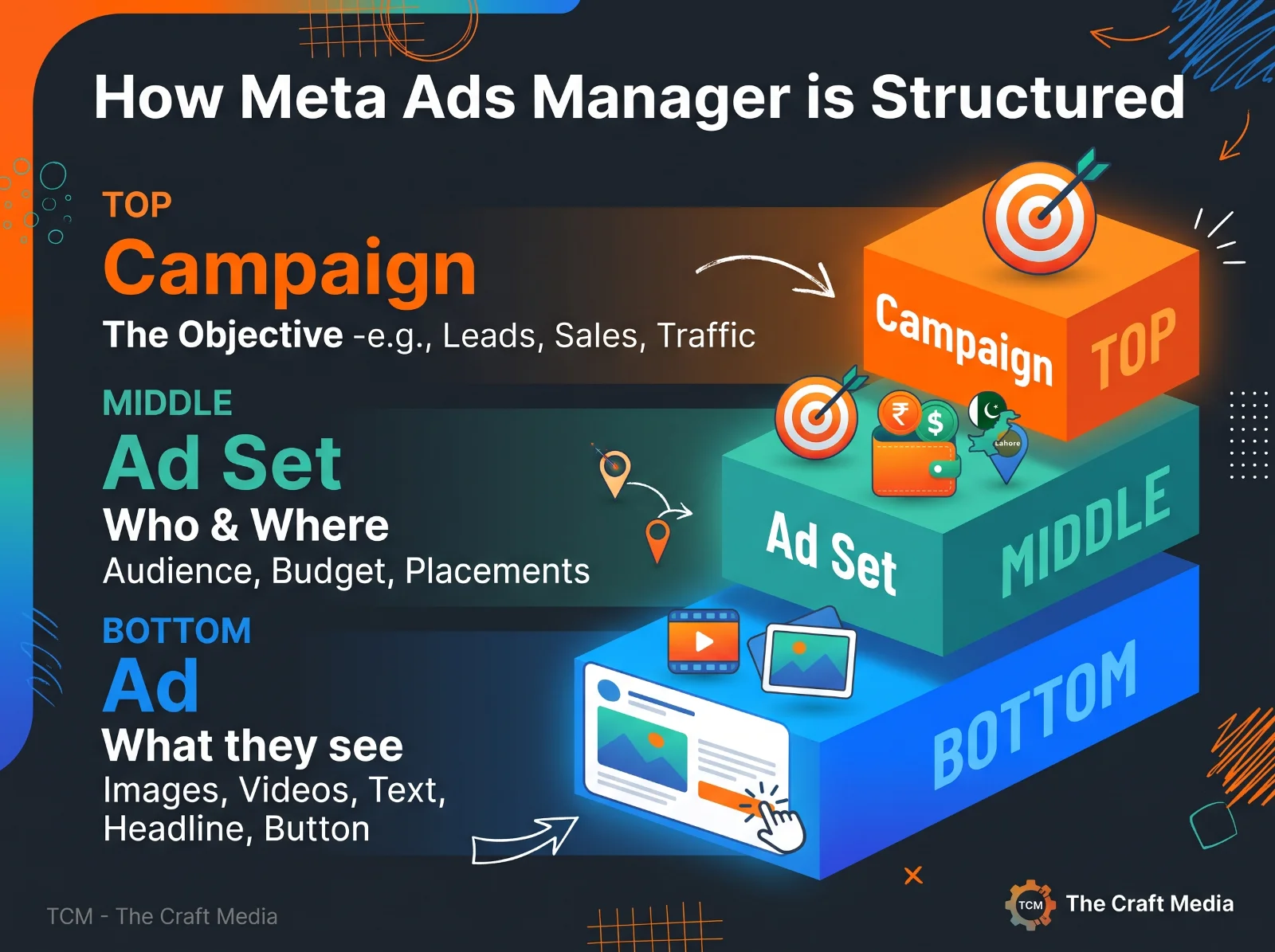
Every ad account has three levels, and beginners often mix them up:
Level | What you decide | Beginner example |
|---|---|---|
Campaign | The objective, meaning the result you want | Leads |
Ad set | Audience, budget, schedule and placements | People aged 25–45 in Lahore interested in home décor, with a daily budget |
Ad | The image or video, text, headline and button | A 15-second video with a “Learn more” button |
Are Facebook Ads Worth It for Beginners?
They can be, if you have a clear offer, a website or page that makes it easy to respond, and the patience to test. They’re a poor fit if you can’t afford to experiment or you expect instant results.
Advantages
• Precise targeting by location, age, interests and past behavior.
• You can start with a small budget and scale what works.
• Fast feedback: you see clicks, leads and costs within days.
• Huge reach: estimates put Pakistan at around 71 million Facebook users (see the Pakistan section below).
Drawbacks
• There’s a learning curve in Meta Ads Manager.
• Costs rise as competition rises, especially around sales seasons.
• You need fresh creative, because ads wear out.
• Results aren’t guaranteed, and strict ad policies apply.
What You Need Before You Run Your First Facebook Ad
Requirement | Why it matters |
|---|---|
A Facebook Page | Your ads run under your Page’s identity |
A Meta business portfolio (previously called Business Manager) | Keeps your Page, ad account and people organized and secure |
An ad account and payment method | Needed to bill you. Choose your currency carefully, because it can’t be changed later |
The Meta pixel (and ideally the Conversions API) | Tracks what people do on your website after clicking, such as sign-ups or purchases |
A fast landing page | A slow or confusing page wastes the click you paid for. A well-built website lifts every campaign |
A clear offer | “Free quote,” “20% off this week” or “Book a consultation” gives people a reason to act |
A tracking plan | Decide in advance what counts as a result: a lead, a call or a purchase |
How to Run Facebook Ads for Beginners: 8 Steps
Step 1: Choose one clear objective
Open Meta Ads Manager, click Create, and pick the objective that matches the action you want. Meta groups campaigns into six objectives, explained in the table further down. Choose one objective per campaign instead of trying to achieve everything at once.
Step 2: Set your budget and schedule
Choose a daily or lifetime budget. Meta applies a minimum that depends on your currency and the result you optimize for, and Ads Manager shows it when you set the budget. Pick an amount you can sustain for at least a week, because stopping and restarting disrupts learning.
Step 3: Define your audience
Set your location, age range and, if useful, interests. Beginners often over-target. Start with a clear location and age range, add one or two interests at most, and let Meta’s system find people inside that group.
Step 4: Choose your placements
For a first campaign, Advantage+ placements, which let Meta show your ad wherever it performs best, are a sensible default. You can restrict placements later once you see data.
Step 5: Create your ad
Pick a format, upload your image or video, and write the text, headline and call-to-action button. Make the first line clear, put one message in each ad, and use vertical or square visuals that look good on a phone.
Step 6: Set up conversion tracking
Choose the conversion event you want Meta to optimize for, such as a lead or a purchase, and check in Events Manager that your pixel is firing. Without this, Sales and Leads campaigns can’t work as intended.
Step 7: Review and publish
Meta reviews ads before they run, and most are reviewed within 24 hours, though some take longer. If an ad is rejected, read the reason and fix it instead of re-submitting the same ad.
Step 8: Monitor, then improve slowly
Check results daily but change things sparingly. Big edits, such as a large budget change, a new audience or a new objective, can restart Meta’s learning phase. Give each ad set several days of data before judging it.
Facebook Ad Objectives Explained
Objective | What Meta optimizes for | Best for | Example |
|---|---|---|---|
Awareness | Reach and brand recall | New brands and launches | Announcing a new store |
Traffic | Visits to a website, profile or chat | Driving readers to content | Sending people to a guide |
Engagement | Interactions such as messages, video views and post engagement | Social proof and conversations | Promoting a Reel or starting WhatsApp chats |
Leads | Form fills, calls and messages | Service businesses | Quote requests |
App promotion | App installs and in-app actions | Mobile apps | Getting installs |
Sales | Purchases and other conversion events | Online stores and bookings | Orders from your website |
Beginner tip: If you want enquiries or purchases, choose Leads or Sales and install the pixel. Traffic finds people likely to click, which isn’t always the same as people likely to buy.
Facebook Ad Formats: Which One Should You Use?
Format | Best for | Tip |
|---|---|---|
Single image | Simple offers and announcements | Use a clear, bright image with minimal text |
Video or Reels ad | Showing a product or telling a story | Make the first three seconds count and use vertical video |
Carousel | Showing several products or steps | Make each card useful on its own |
Collection | Ecommerce catalogs | Pair it with a product catalog |
Lead ad (instant form) | Collecting contact details without leaving Facebook | Ask for as few fields as possible |
Click-to-message ad | Starting chats on Messenger, Instagram or WhatsApp | Prepare replies in advance and answer fast |
How Much Do Facebook Ads Cost for Beginners?
There’s no fixed price. Because ads are sold in an auction, cost depends on your audience, industry, season, creative quality, objective and country. A beginner’s budget should come from simple math, not a guess about what other businesses spend.
1. Decide what a result (a lead or a sale) is worth to you.
2. Estimate what one result might cost.
3. Remember that Meta works best with roughly 50 results a week per ad set.
For example, if you guess a lead will cost about $4 (a planning guess, not a benchmark), 50 leads a week means about $200 a week, or roughly $29 a day. If that’s too much, optimize for a cheaper action, such as a landing page view or a message, or run just one ad set.
Learn these terms so you can read your reports:
Metric | What it tells you | How it’s calculated |
|---|---|---|
CPM | Cost to show your ad 1,000 times | Spend ÷ impressions × 1,000 |
CTR | How often people click after seeing it | Clicks ÷ impressions × 100 |
CPC | Cost of one click | Spend ÷ clicks |
CPL / CPA | Cost per lead or per action | Spend ÷ leads (or actions) |
ROAS | Revenue earned for each unit spent | Revenue ÷ spend |
Frequency | How often one person saw your ad | Impressions ÷ reach |
Facebook Ads Targeting: How to Reach the Right People
• Core audiences are built from location, age, language and interests.
• Custom audiences are built from your own data, such as customer lists, website visitors and people who engaged with your Page.
• Lookalike audiences find people similar to your best customers. They need a source audience of at least 100 people from one country, and larger, higher-quality lists work better.
• Advantage+ audience lets Meta’s system look beyond your suggestions to find likely customers.
Beginner targeting tips:
• Start broad enough for Meta to learn. An audience that’s too narrow gets expensive.
• Exclude people who already bought, so you don’t pay to reach them again.
• Use city-level targeting for local businesses.
• Change one audience setting at a time so you know what made the difference.
How to Write Facebook Ad Copy That Gets Clicks
Use a simple formula: hook, benefit, proof, call to action. Open with something that stops the scroll, say what the person gains, add a reason to believe you, and tell them exactly what to do next.
Weak ad (hypothetical dental clinic) | Stronger ad |
|---|---|
“We are the best dental clinic. Visit us today!” | “Putting off the dentist? Book a gentle check-up in Lahore this week. Evening slots available. Tap Book now.” |
Creative tips:
• Research first. The free Meta Ad Library shows the active ads of any Page, which is a quick way to see what competitors run.
• Lead with the strongest visual or sentence, because people decide in seconds.
• Keep text on images short and make sure it’s readable on a small screen.
• Use real photos and video of your product, team or customers instead of generic stock images.
• Test two or three versions of one ad, and replace creative when frequency climbs and results drop.
Facebook Ads in Pakistan: What Beginners Should Know
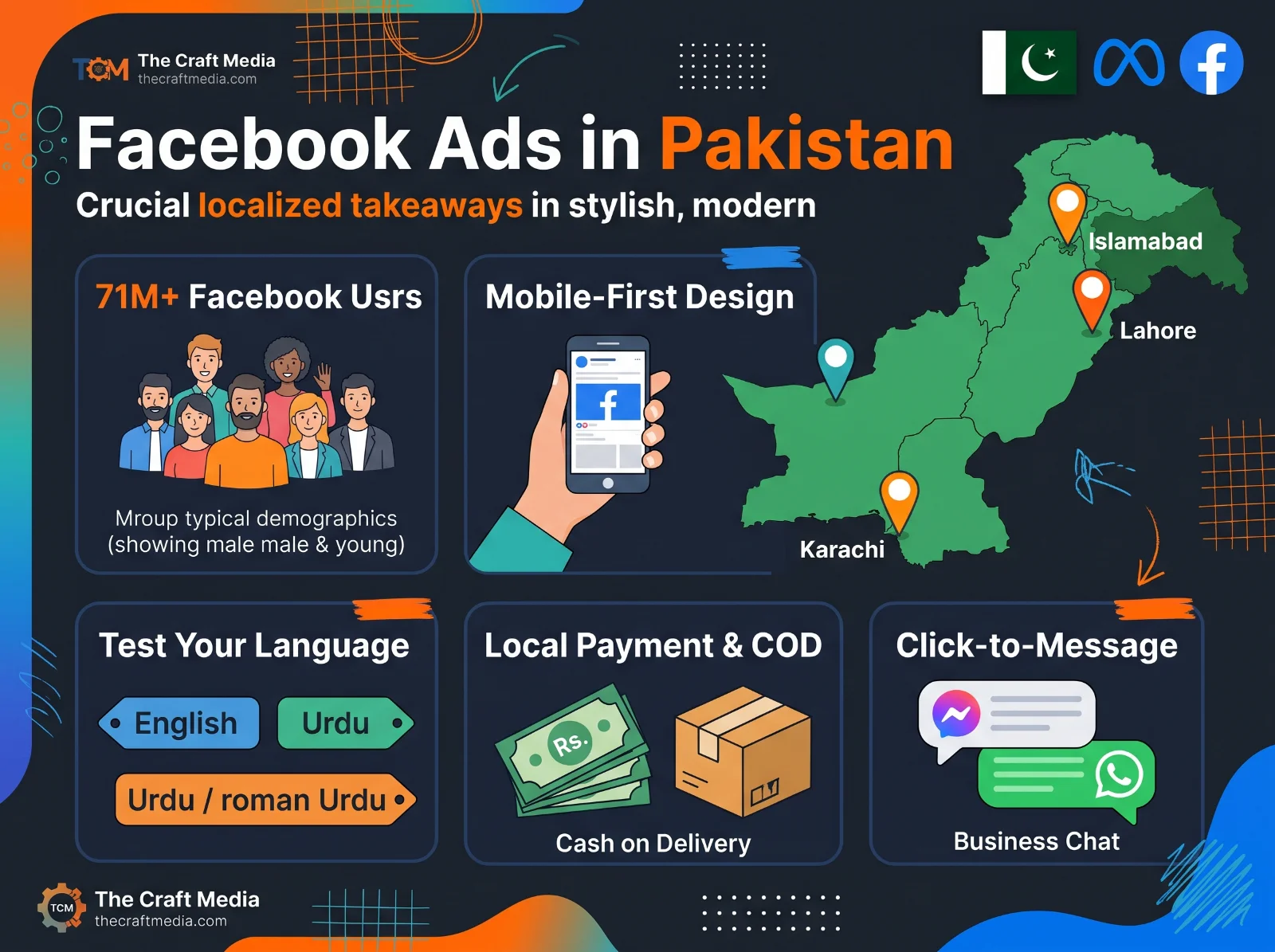
The audience is large. DataReportal’s Digital 2026: Pakistan report counts 117 million internet users in October 2025. Audience estimates compiled by NapoleonCat from Meta’s advertising data put Pakistan at about 71.2 million Facebook users in June 2026, about 75 percent of them men, with 25–34 the largest age group.
For Facebook ads for beginners in Pakistan, that translates into practical rules:
• Design for mobile. Most customers will see your ad and landing page on a phone.
• Don’t assume your audience. Because users skew young and male, test your targeting and creative if your customers are mostly women.
• Target by city. Use Lahore, Karachi, Islamabad or the area you actually serve.
• Test your language. Try English, Urdu and Roman Urdu, and keep the one that gets better results.
• Consider click-to-message ads. If your customers prefer to chat before buying, send them to Messenger or WhatsApp.
• Show prices in rupees and state delivery terms. If you offer cash on delivery, say so in the ad.
• Check billing early. Confirm that your payment method works with your ad account and that you chose the right currency before you launch.
Facebook Ads for Beginners: 10 Mistakes to Avoid
Mistake | Why it hurts | Fix |
|---|---|---|
Boosting posts with no goal | The Boost button offers limited options and control | Create campaigns in Ads Manager |
Choosing the wrong objective | Meta optimizes for the wrong action | Match the objective to the result you want |
No pixel or tracking | You can’t tell what’s working | Install the pixel before spending |
Targeting too narrowly | Costs rise and delivery slows | Widen the audience |
Changing too much too soon | Edits can restart learning | Change one thing at a time |
Splitting a small budget across many ad sets | No ad set gets enough data | Run fewer ad sets |
Sending clicks to a weak page | Visitors leave without acting | Use a fast, mobile-friendly page with one clear next step |
Running one creative | Ads fatigue quickly | Test two or three versions and refresh them |
Judging by likes | Likes don’t pay the bills | Track cost per lead or sale |
Ignoring ad policies | Ads get rejected and accounts get restricted | Read Meta’s standards first |
Follow the Rules: Facebook Ad Policies in Plain English
Meta’s Advertising Standards decide what you can run. The basics:
• Don’t make false or misleading claims, or promise guaranteed results.
• Don’t imply you know personal attributes about the viewer, such as health or financial status.
• Be careful with health, weight-loss and before-and-after content, which is closely restricted.
• Ads about credit, employment, housing, and social issues or politics have extra rules.
• Make sure your landing page matches your ad and works properly.
How to Read Your Results and Fix Problems
What you see | Likely cause | What to try |
|---|---|---|
Low click-through rate | Weak hook or visual, or the wrong audience | Test a new first line and image, then test the audience |
Many clicks, few leads or sales | Landing page or offer doesn’t match the ad, or the page is slow | Fix the page and make the ad and page say the same thing |
High CPM | Narrow audience, high competition or low-quality ad | Widen the audience and improve the creative |
High frequency, falling results | Ad fatigue | Add new creative or widen the audience |
Slow spending | Budget too low or audience too small | Raise the budget or widen the audience |
Ad rejected | Policy issue | Read the reason, edit and resubmit |
To learn what really works, use Meta’s A/B test tool and compare one variable at a time, such as two headlines or two images.
Facebook Ads for Beginners Launch Checklist
• My Facebook Page and ad account are set up, with the right currency.
• The Meta pixel is installed and firing correctly.
• I know what counts as a result and how I’ll measure it.
• My objective matches that result.
• My offer is clear and easy to understand.
• My landing page loads fast and works on mobile.
• My audience is broad enough to learn from.
• My budget can run for at least a week.
• I have two or three creative versions ready.
• My copy follows Meta’s ad policies.
• I’ve planned when I’ll review results and what I’ll change.
Frequently asked questions
Is Facebook advertising good for beginners?
Yes, if you start with one clear goal, a small test budget and proper tracking. Beginners get into trouble by boosting posts with no goal or spreading money across too many ad sets.
How much should a beginner spend on Facebook ads?
Spend an amount you can afford to lose while you learn. Work backwards from the cost of one result and aim for enough budget to reach about 50 results a week per ad set. If that’s out of reach, optimize for a cheaper action or run one ad set.
How long does it take for Facebook ads to work?
You can see clicks within hours, but meaningful results usually take at least a week of data, and often longer while the system learns and you test creative.
What’s the difference between boosting a post and running Facebook ads?
Boosting is a quick way to promote a single post with limited options. Creating a campaign in Ads Manager gives you full control over objectives, audiences, placements and tracking, so it’s better for business results.
Do I need a website to run Facebook ads?
Not always. You can run lead ads or click-to-message ads without one. But a fast website with a clear offer converts better and lets you track results with the pixel.
Do I need a Facebook Page?
Yes. Your ads run under a Page’s identity, and Instagram ads can use a linked Instagram account.
Are Facebook ads the same as Meta ads?
Meta owns Facebook, Instagram and Messenger. Ads for all of them are created in Meta Ads Manager, so “Facebook ads” and “Meta ads” usually mean the same thing.
Final thoughts: start small, learn fast
Facebook ads for beginners don’t need a big budget or clever tricks. They need one clear objective, working tracking, a simple offer and the patience to test. Start with a small campaign, change one thing at a time, and let the numbers show you what to do next. If you’d like help planning or running your first campaign, tell us about your project and you’ll get a clear plan, timeline and price within 48 hours.
Key takeaways
• Facebook ads are paid ads you create in Meta Ads Manager. They can appear on Facebook, Instagram and Messenger, among other places.
• Start every campaign with one clear objective: awareness, traffic, engagement, leads, app promotion or sales.
• Install the Meta pixel before you spend, so you can see what happens after someone clicks.
• Meta’s system needs roughly 50 results a week per ad set to optimize well, so run fewer ad sets with enough budget instead of many tiny ones.
• Your offer and creative matter more than clever targeting. Judge success by cost per result, not likes.
• Begin with a test budget you can afford to lose, and change one thing at a time.